Plan the day
Daily Tasks
Create daily, weekly, monthly, and one-time work with notes, links, visual guides, and photo evidence.
How it works
For the Employer
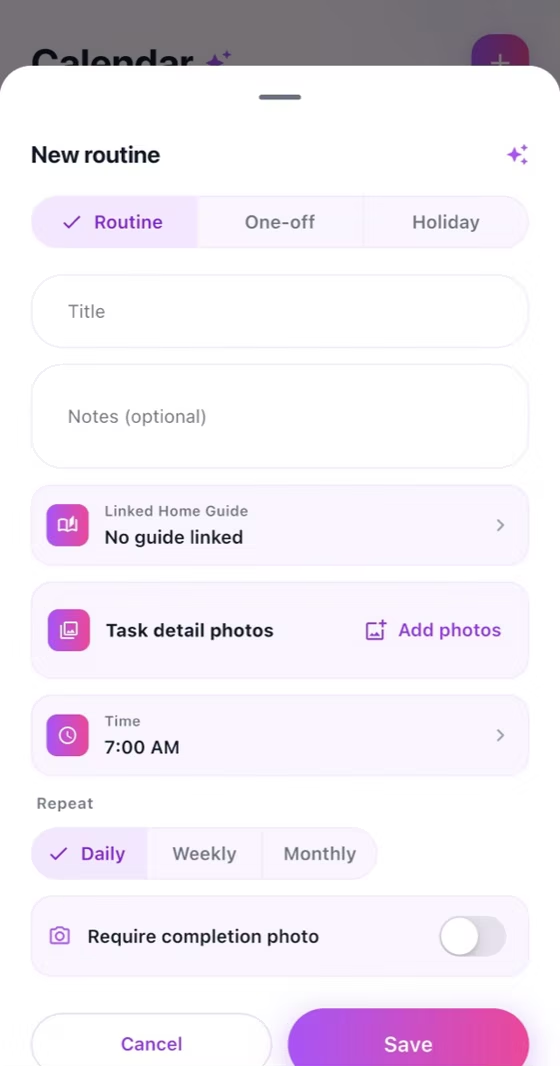
Create the task, choose Daily, Weekly, Monthly, or One-time, and set its due time.
Add notes, links, a Home Guide, and up to three reference photos before saving.
Open the completed task and review the Helper's completion photos and status.
For the Helper
Open the assigned task and review its time, notes, links, guide, and reference photos.
Follow the instructions and prepare up to three completion photos when evidence is required.
Mark the task complete, upload the photos, and confirm that the completed status is visible.
How it works
Create a Daily, Weekly, Monthly, or One-time task with its due time.
Add notes, clickable links, a linked Home Guide, and up to three detail photos.
The Helper completes the work and both sides can review up to three completion photos.
For the Employer
Set the schedule, add clear details, attach up to three reference photos, and review completion evidence.
For the Helper
Open each task before starting, follow linked guidance, and upload the required completion photos.
Common checks
Common checks
- Confirm the correct household, account, record, date, and role before saving.
- Review names, notes, links, dates, amounts, and status before the other person acts.
- Keep uploads within the in-app limit; if offline, reconnect and retry.