Teach the method
Home Guides
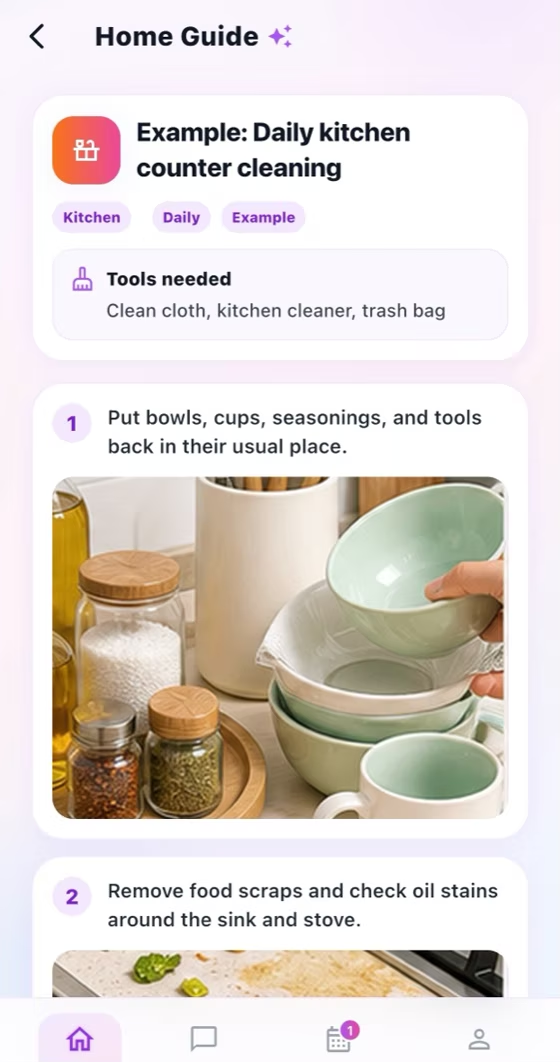
Create visual household procedures with categories, step text, and real step images.
How it works
For the Employer
Create or edit a guide in the category that matches the household procedure.
Add ordered step text, real photos, and useful links that show the expected result.
Link the finished guide to any task that requires the same method.
For the Helper
Open the Home Guide from its library or directly from the assigned task.
Follow every text, image, and link in order, and zoom photos when detail matters.
Return to the task and complete it only after following the linked procedure.
How it works
Choose a category such as kitchen, bathroom, room, window, cooking, or organizing.
Add step text and a relevant image for each part of the procedure.
Link the finished Home Guide to a task that needs the same standard.
For the Employer
Document household-specific standards and link the right guide to a task.
For the Helper
Open the linked visual procedure and follow every step in order.
Common checks
Common checks
- Confirm the correct household, account, record, date, and role before saving.
- Review names, notes, links, dates, amounts, and status before the other person acts.
- Keep uploads within the in-app limit; if offline, reconnect and retry.