Manage leave clearly
Rest Days
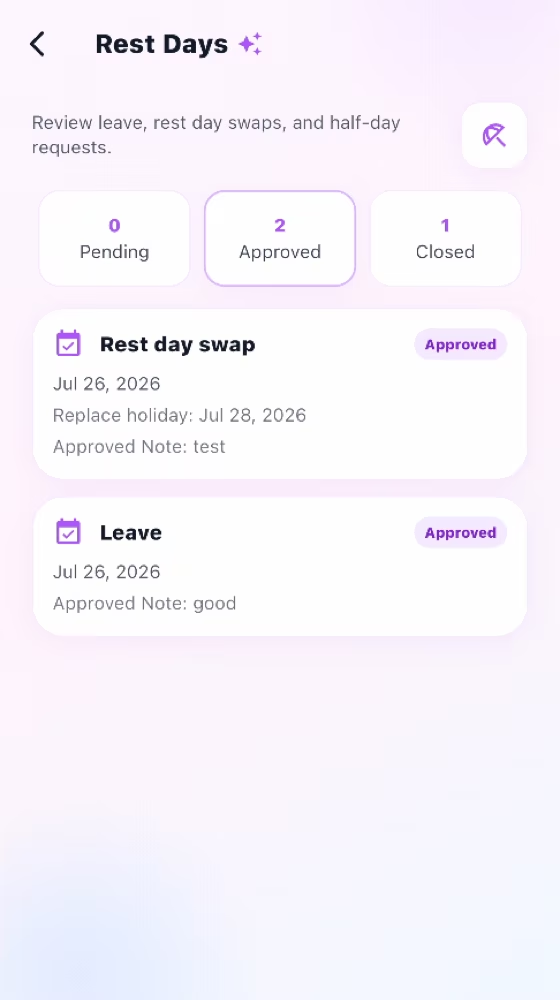
Handle leave and replacement rest days with notes, decisions, validation, and calendar sync.
How it works
For the Employer
Open the Helper's request and review the leave type, dates, and note.
For a replacement, confirm the replaced date is a real holiday and differs from the new date.
Approve or reject with a note, then confirm the decision appears in Calendar.
For the Helper
Choose Leave or Replacement rest day, select the dates, and add an optional note.
For a replacement, choose a new date and a different existing holiday to replace.
Submit the request and track the Employer's decision in Rest Days and Calendar.
How it works
The Helper selects Leave or Replacement rest day and adds an optional note.
For a replacement, choose the new date and the existing holiday being replaced.
The Employer records a decision and approved dates synchronize to Calendar.
For the Employer
Approve or reject the request with a note and confirm approved dates in Calendar.
For the Helper
Request leave or replace an existing holiday using valid, different dates.
Common checks
Common checks
- Confirm the correct household, account, record, date, and role before saving.
- Review names, notes, links, dates, amounts, and status before the other person acts.
- Keep uploads within the in-app limit; if offline, reconnect and retry.