Keep payroll auditable
Pay Records
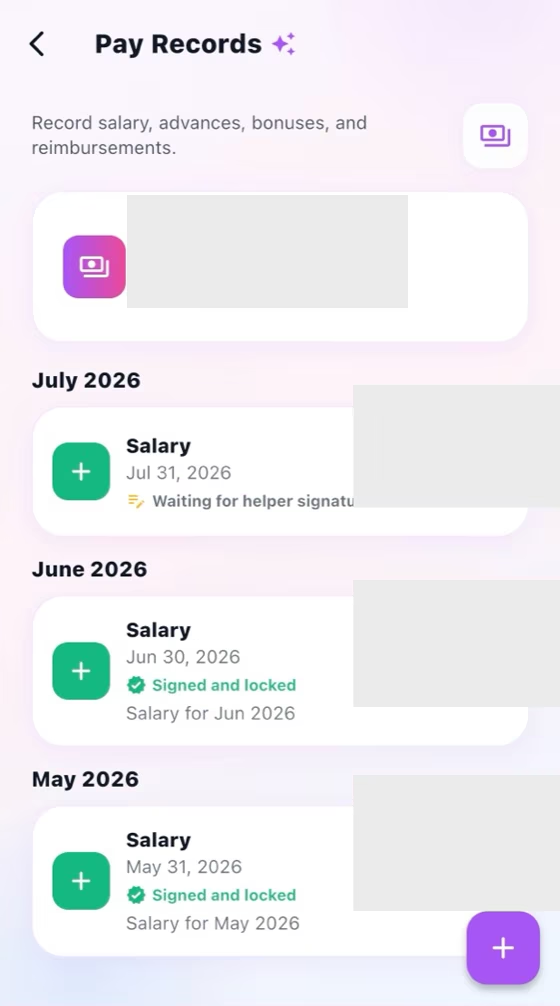
Create monthly pay records with translated notes, handwritten signatures, and locked signed records.
How it works
For the Employer
Create the pay record for the correct worker, year, and month, then enter the payment details.
Add a clear note and review every amount before sending the record for signature.
Track the signature state and keep the locked signed record in monthly history.
For the Helper
Open the pay record and verify the month, amounts, payment details, and translated note.
Sign by hand only after the complete record is correct.
Return to monthly history to view the signed, locked record when needed.
How it works
The Employer creates a record for the correct year and month.
The Helper opens the detail, reviews amounts and translated notes, then signs by hand.
A signed record locks for both sides and remains available in monthly history.
For the Employer
Create each monthly record, add payment details, and monitor records awaiting signature.
For the Helper
Review every detail and sign by hand only after confirming the record is correct.
Common checks
Common checks
- Confirm the correct household, account, record, date, and role before saving.
- Review names, notes, links, dates, amounts, and status before the other person acts.
- Keep uploads within the in-app limit; if offline, reconnect and retry.