Set expectations once
House Rules
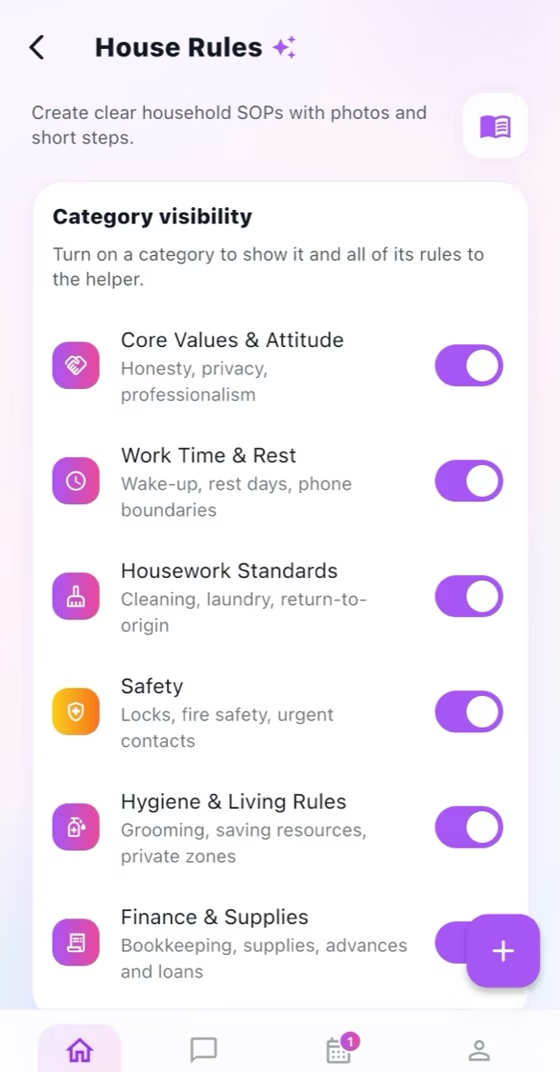
Organize stable household expectations as simple bullet points under enabled categories.
How it works
For the Employer
Enable the rule categories that apply to this household.
Add or edit one concise instruction per bullet under the correct category.
Review the Helper view and remove outdated rules when expectations change.
For the Helper
Open House Rules and read each enabled category before starting related work.
Long-press text to copy it or open a recognized link when more detail is provided.
Ask in chat when a rule is unclear instead of guessing.
How it works
The Employer enables the household-rule categories that apply.
Add each instruction as one simple bullet point under the correct category.
The Helper sees a readable category list without management controls.
For the Employer
Enable relevant categories and add, edit, or remove concise bullet-point rules.
For the Helper
Read a clean view containing only enabled categories and their rules.
Common checks
Common checks
- Confirm the correct household, account, record, date, and role before saving.
- Review names, notes, links, dates, amounts, and status before the other person acts.
- Keep uploads within the in-app limit; if offline, reconnect and retry.